



Table of contents: Turning on the speed controller 🠇 Memorizing speed 🠇 Disabling the stored speed 🠇 Restore the speed entered into memory 🠇 Changing the speed entered into…🠇 Cancel the speed entered into memory 🠇
The speed controller allows you to maintain a constant vehicle speed set by the driver, regardless of the road profile and without pressing the gas and brake pedals. The system can remember the speed if it is more than 40 km/h.
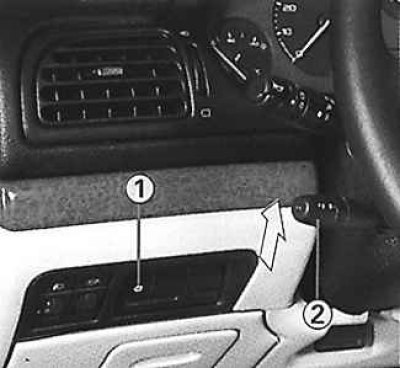
Turning on the speed controller
Press switch 1. The indicator light will come on. Pressing switch 1 again will turn the system off.
Memorizing speed
Once the vehicle has reached the desired speed, quickly move switch 2 upwards. The speed will be entered into the system memory and is maintained automatically from that moment on.
Disabling the stored speed
You can temporarily disable the speed stored in memory by pulling the switch or pressing the brake or clutch pedal.
Restore the speed entered into memory
After temporarily disabling the stored speed, quickly move lever 2 upward. The vehicle will again move at the stored speed.
Changing the speed entered into memory
To memorize a speed higher than the one previously stored in memory, move lever 2 upwards. Once the desired speed is reached, release it.
To memorize a speed lower than the one previously stored in memory, move lever 2 down. Once the desired speed is reached, release it.
Cancel the speed entered into memory
It is lost from the system memory when the ignition is turned off or when switch 1 is pressed (the indicator goes out).