



Table of contents: Front panel and controls 🠇 Digital display readings 🠇 Remote control lever on the steering…🠇 Technical specifications 🠇 Anti-theft coding device 🠇 Radio 🠇 Audio cassette player 🠇 CD player 🠇
Front panel and controls
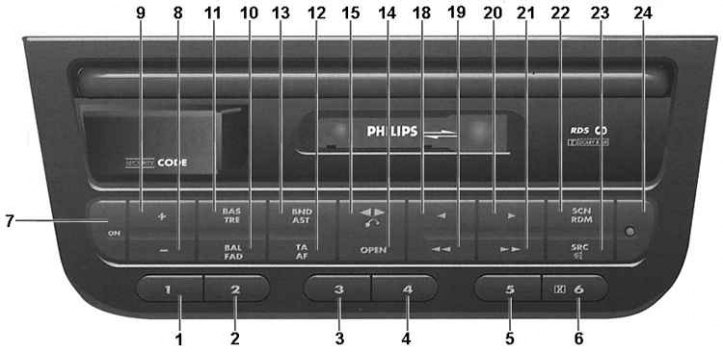
1-6. Buttons 1-6. Preset (radio). Selecting a CD (CD player). Button 6: Dolby BNR noise reduction system on/off (cassette player)
7. ON button. Power on/off
8. "-" button. Volume down, bass down, treble down, left/right speaker balance, front/rear speaker balance
9. "+" button. Volume up, bass boost, treble boost, left/right speaker balance, front/rear speaker balance
10. BAL/FAD button. Press once: left/right speaker balance. Press twice: front/rear speaker balance
11. BAS/TRE button. Press once: selects the bass tone control. Press twice: selects the treble tone control
12. TA/AF button Short press: Priority for traffic information (tA indicator is on). Long press: Turns on/off the AF function to automatically search for the broadcast frequency of the selected RDS station that provides the best signal reception
13. BND/ AST button. Short press: Switches the FM1/ FM2/ AST/ MW/ LW ranges. Long press: Enables automatic memorization of FM stations (Autostore)
14. OPEN button. Opening/closing the front curtain
15. Button
 . Short press: auto reverse. Long press: eject cassette
16. Front curtain
17. Cassette player
18. Button
 . Manual search for radio stations, search for the beginning of the previous recording on a cassette, search for the beginning of the previous track on a CD player
19. Button
 . Automatic search for radio stations, fast rewind of cassette tape, search for the beginning of the previous track on the CD player
20. Button
 . Manual search for radio stations, search for the beginning of the next recording on a cassette, search for the beginning of the next track on a CD player
21. Button
 . Automatic radio station search, fast forward of cassette tape, fast head movement to the beginning of CD
22. SCN/RDM button Short press: scan preset stations (radio), scanning tape recordings, scanning CD tracks
23. SRC/ button
 . Short press: switching the radio operating mode (receiver/cassette/CD player). Long press: mute
24. Anti-theft indicator light
Digital display readings
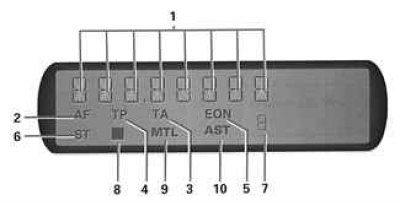
1. Frequency of the received radio signal and range, name of the received station, other information
2. AF function enabled (frequency search to improve signal reception quality)
3. TA mode enabled (priority of traffic information)
4. The receiving station transmits information about the traffic situation
5. The received station is part of the EON network 6. Stereo signal reception
7. Numbers 1-6 - the preset number on the receiver, the CD number in the store
8. Dolby BNR system is enabled
9. "Metal" or "chrome" type cassette playback
10. Automatic memorization of FM stations is enabled
Remote control lever on the steering column
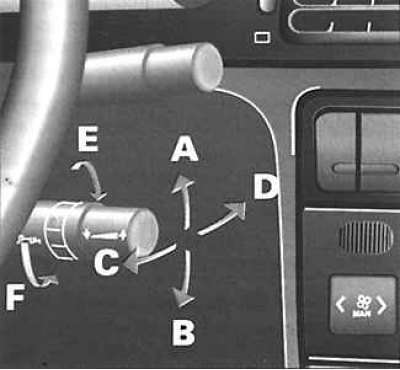
A. Increasing the volume of the sound
B. Decreasing the sound volume
C. Automatic station search, search for the beginning of the next recording on a tape, search for the beginning of the next track on a CD player
D. Automatic station search, search for the beginning of the previous recording on the tape, search for the beginning of the previous track on the CD player
E. Selecting the operating mode of the radio (receiver/audio cassette player/CD player).
F. Range selection (with one touch), reverse the direction of playback of a recording on a cassette, select the next CD (with one touch)
Technical specifications
Anti-theft: Encrypted device with 4-digit code.
Remote control: a lever with controls mounted on the steering column.
Audio system:
- mute sound.
- output power: 4x30 W (4x10 W) with a nonlinear distortion coefficient of up to 1%.
Radio receiver: RDS radio data system.
Receiver frequency ranges:
- FM: 87.5-108 MHz;
- MW (medium waves): 531–1629 kHz;
- LW (long waves): 144–288 kHz.
Number of settings to be fixed:
- FM (automatic memorization in AST mode): 6;
- FM (manual memorization): 12 (2 sub-ranges FM1 and FM2 with 6 stations each);
- MW (manual memorization): 6;
- LW (manual memorization): 6.
Audio cassette player:
- autoreverse
- automatic tape type detector
- search recording by pauses
- scanning records
- dolby B noise reduction system
CD player:
- 6 CD magazine
- fast movement of the reading head
- automatic track search
- scan tracks
- random playback order of records.
All messages concerning the operating modes of the radio are displayed on the central display of the vehicle control panel.
Anti-theft coding device
The device is based on a microprocessor. After disconnecting the car radio from the car's electrical network (removing the battery, dismantling the radio or installing it for the first time) you must enter a security code. The radio can only be turned on after entering the correct code.
Enter code
1. Turn on the radio with the ON button. Press the preset button 1. The display will show 0 - - -. Press the buttons 18 or 20 several times until the first digit of the code (7 - - -) appears on the display.
2. To confirm the first digit and proceed to entering the second digit of the code, press button 1. The display will show 70 - - -. Press buttons 18 or 20 several times until the second digit of the code (73 - -) appears on the display.
3. Follow these steps to enter the correct code and finally press button 1 to confirm the fourth digit of the code. If the code entered is correct, you will hear a short high-pitched signal. The radio is ready for operation.
(Data published on the website: PEUGEOTBOOK)
Case of entering the wrong code
If an error is made when entering the code, a short low-tone signal will sound. The display will show the message "ERR CODE". A repeat attempt to enter the code is only possible after a pause of 1 minute. The waiting period is doubled after another unsuccessful attempt. This period is limited to approximately 32 minutes. Switching off the radio does not affect the duration of the mandatory pause. The pause time will start again when the radio is switched on. After the pause has ended, the display will show the message "CODE". Now you can enter the code.
The red indicator 24 flashes when the ignition is on, indicating that the anti-theft device is on. The indicator goes out when the ignition or radio is turned on.
After disconnecting or reconnecting the battery, the message "CODE" appears on the display of the radio. Enter the code.
Radio
All the main functions performed by the radio receiver are similar to the 4030 car radio. In addition, the following functions have been added:
Scanning pre-selected radio stations. The radio provides the ability to scan six pre-selected stations in any range. During the scanning process, you can select one of them.
Scanning pre-selected radio stations operating in one range. Select the range you wish to scan. Briefly press the SCN 22 button. When scanning, all pre-selected radio stations operating in this range are switched on in turn. The order is determined by the order of the memory cells assigned to buttons 1-6. Scanning begins with the radio station entered into the memory cell of button 1, or with the radio station following the one currently selected. Approximate duration of listening to each station (tA mode is off) is:
- five seconds with good reception quality;
- approximately one second with a weak radio signal.
Approximate listening time for each station (tA mode is on) is:
- five seconds for radio stations capable of transmitting traffic announcements;
- approximately one second for radio stations not capable of transmitting traffic announcements.
Selecting a radio station during scanning. Briefly press the SCN 22 button while listening to a radio station you like to keep the radio tuned to that station. The order in which the radio tunes to pre-selected radio stations does not change.
Interrupting Scan To interrupt scanning of pre-selected radio stations:
- select any radio station;
- select any function other than those activated by the TA/AF button 12.
Audio cassette player
Searching for the beginning of a recording by a pause. This function allows you to start playing the current recording from the beginning or the next recording on the tape. This function is based on searching for pauses between recordings. Searching for the beginning of a recording can also be done using the remote control lever on the steering column.
Search for the beginning of the previous recording. To search for the beginning of the current recording, press button 18. While searching for the beginning of a recording, the sound is muted and the message "PREV 1" is displayed. After the beginning of a recording is found, playback resumes. This function can also be activated using the remote control lever. Pressing button 18 n times skips to the beginning of the (n-1)th recording, counting from the current one. The message "PREV n" is displayed. While searching for the beginning of the desired recording, the sound is muted and the display shows the transitions from the beginning of one recording to the beginning of the next. After the beginning of the desired recording is found, playback resumes. Each time button 18 is pressed, the value of n on the display increases by one.
Searching for the beginning of the next track. To search for the beginning of the next track, press button 20. While searching for the beginning of a track, the sound is muted and the display shows "NEXT 1". Once the beginning of a track is found, playback resumes. This function can also be activated using the remote control lever on the steering column. Pressing button 20 n times skips to the beginning of the nth track, counting from the current track. The display shows "NEXT n". While searching for the beginning of the desired track, the sound is muted and the display shows the transitions from the beginning of one track to the beginning of the next. Once the beginning of the desired track is found, playback resumes. Each time button 20 is pressed, the value of n on the display increases by one.
Scanning records. The scanning function allows you to quickly listen to the initial fragments of all records on an audio cassette. Scanning is based on the use of pauses between records. Briefly press the SCN/RDM 22 button to start scanning. The message "SCAN" will appear on the display. The player will play 10-second initial fragments of all records on the audio cassette, starting with the record that follows the current one. To stop scanning, briefly press the SCN/RDM 22 button again. Playback will begin from the record where scanning was interrupted.
CD player
Scanning a CD. Briefly press the SCN/RDM button 22. Each track on the CD will be played for ten seconds. The display shows "SC [track number]". To stop scanning, briefly press the "SCN/RDM" button 22 again. Playback of the CD will resume from the track that was playing when scanning was cancelled.
Playing tracks in random order. Press the "SCN/RDM" button 22 and hold it for at least two seconds. A short beep confirms that the random playback mode has been activated. Playback begins with the disc you were listening to when the mode was activated. First, the CD player plays all tracks on the current CD in random order, then moves on to the following CDs. When the entire stock of CDs in the disc magazine is exhausted, the CD player returns to the first CD. When playing tracks in random order, the display constantly shows the message "RD [track number] CD" and the number of the CD being played. [Track number] determines the position of the track on the CD. To cancel the random playback mode, press the SCN/RDM button 22 again and hold it for at least two seconds.