



Table of contents: Front panel and controls 🠇 Indication on digital display 🠇 Remote control from the steering…🠇 Technical specifications 🠇 Anti-theft coding device 🠇 Audio system 🠇 Radio 🠇 Radio Data System RDS 🠇
Front panel and controls
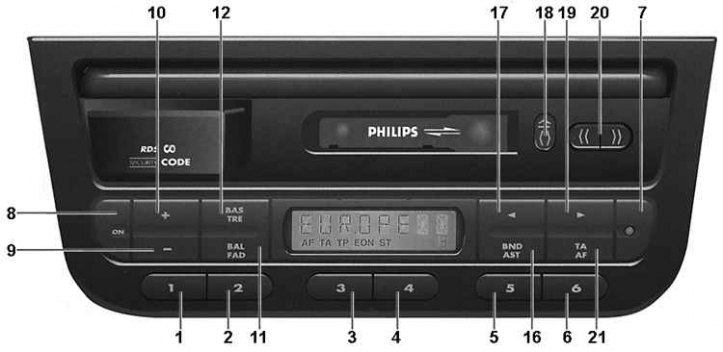
1–6. Buttons 1–6. Presetting the receiver
7. Anti-theft indicator
8. ON button. Power on/off
9. "-" button. Volume down, bass down, treble down, left/right and front/rear speaker balance
10. "+" button. Increases volume, boosts bass, boosts treble, balances left/right and front/rear speakers
11. BAL/FAD button. Press once: left/right speaker balance. Press twice: front/rear speaker balance
12. BAS/TRE button. Press once: selects the bass tone control. Press twice: selects the treble tone control
16. BND/AST button. Short press: switches between FM1/FM2/AST/MW/LW bands. Long press: switches on the automatic memorization function of stations in the FM band (Autostore)
17. Button
 . Automatic or manual search for radio stations in the lower part of the range
18. Buttons
 . Partial press: reverse. Full press: eject cassette
19. Button
 . Automatic or manual search for radio stations in the upper part of the range
20. Buttons
 . Fast forward/rewind
21. TA/AF button Short press: Priority for traffic information Long press: Turns on/off the AF function to automatically search for the broadcast frequency of the selected RDS station that provides the best signal reception
Indication on digital display
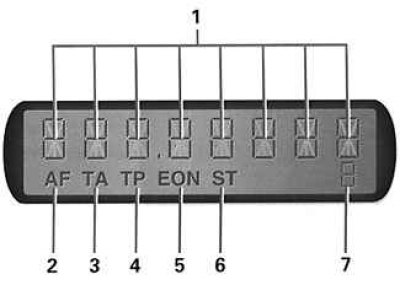
1. Alphanumeric information. Frequency of the received radio signal and range, name of the radio station, other information
2. AF. AF function enabled (frequency search to improve signal reception quality)
3. TA. TA mode enabled (priority of traffic information)
4. TR. The received radio station transmits information about the traffic situation
5. EON. The received radio station is part of the EON network
6. ST. Stereo signal reception
7. Numbers 1–6. Preset number
Remote control from the steering column
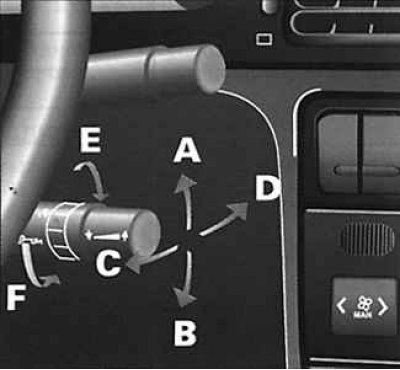
A. Up. Increase sound volume
B. Down. Decrease the sound volume
S. Back. Automatic search for stations in the upper part of the range
D. Forward. Automatic search for stations in the lower part of the range
E, F. Rotation. Selecting the operating mode of the radio (receiver or cassette player)
Technical specifications
Anti-theft protection: coded device with 4-digit code.
Steering column remote control: a lever with controls mounted on the steering column to the right of the steering wheel.
Radio receiver: output power: 4x12 W (4x3.5 W with a nonlinear distortion coefficient of up to 1%). RDS radio data system.
Radio frequency ranges:
- FM: 87.5-108 MHz;
- MW: 531–1629 kHz;
- LW: 144–288 kHz.
Number of settings to be fixed:
- FM (automatic memorization in AST mode): 6;
- FM (manual memorization): 12 (2 sub-ranges FM1 and FM2 with 6 stations each);
- MW (manual memorization): 6;
- LW (manual memorization): 6.
Anti-theft coding device
The device is based on a microprocessor. After disconnecting the car radio from the car's electrical network (removing the battery, dismantling the radio or installing it for the first time) you must enter a security code. The radio can only be turned on after entering the correct code.
Enter code
1. Turn on the radio with the ON button. Press the preset button 1. The display will show 0 - - -. Press buttons 17 or 19 several times until the first digit of the code (7 - - -) appears on the display.
2. To confirm the first digit and proceed to entering the second digit of the code, press button 1. The display will show 70 - - -. Press buttons 17 or 19 several times until the second digit of the code (73 - -) appears on the display.
3. Follow these steps to enter the correct code and finally press button 1 to confirm the fourth digit of the code. If the code entered is correct, you will hear a short high-pitched signal. The radio is ready for operation.
Case of entering the wrong code
If an error is made when entering the code, a short low-tone signal will sound. The display will show the message "ERR CODE". A repeat attempt to enter the code is only possible after a pause of 1 minute. The waiting period is doubled after another unsuccessful attempt. This period is limited to approximately 32 minutes. Switching off the radio does not affect the duration of the mandatory pause. The pause time will start again when the radio is switched on. After the pause has ended, the display will show the message "CODE". Now you can enter the code.
The red indicator 7 flashes when the ignition is on, indicating that the anti-theft device is on. The indicator goes out when the ignition or radio is turned on.
After disconnecting or reconnecting the battery, the message "CODE" appears on the display of the radio. Enter the code.
Audio system
Switching on and off is done with the ON button. If the ignition is off, the radio will automatically switch off after 1 hour.
Radio
Buttons 1-6 (see figure Front panel and controls). Short press: Activate fixed tuning to the pre-selected radio station. Long press: Remember the current setting in manual mode.
16. Short press: Switches between FM1/ FM2/ AST/ MW/ LW bands. Long press: Enables automatic memorization of FM stations.
17. Search button (automatic or manual) radio stations in the lower part of the range.
19. Search button (automatic or manual) radio stations in the upper part of the range.
21. Short press: Turn on/off TA mode. Long press: Turn on/off AF function.
Features of radio signal reception
The radio can receive RDS signals. If the signal of the selected radio station in the FM range complies with the RDS standard, the receiver automatically tunes to the frequency that provides the best reception quality.
Selecting a radio station (automatic search)
Press button 17 or 19 (see figure Front panel and controls) to start automatic search and tuning to a radio station. During the search, the selected range is scanned, which is reflected on the display. After tuning to the radio station closest in signal frequency, the display records the broadcast frequency of this station. If the TA mode is enabled, automatic search is limited to RDS stations that broadcast traffic announcements. The TA mode is one of the functions provided by the RDS system.
Automatic search can also be activated using the remote control lever on the steering column.
When searching for radio stations manually, press and hold buttons 17 or 19.
Attention! If after scanning the entire range no broadcasting radio station is found, the radio receiver switches to the search mode for remote stations with a weaker signal.
Remembering settings on a radio station
Using six buttons 1-6, you can preset the receiver to 30 stations: 6 stations in the FM1 sub-range, 6 stations in the FM2 sub-range, 6 stations in the AST range, 6 stations in the MW range, 6 stations in the LW range. The frequencies of six stations in the AST range are entered into memory automatically. Memorization of fixed settings for selected radio stations operating in other ranges is done manually.
Article based on material from the website PeugeotBook.ru
Manual memorization of the selected station setting
Select the desired range (except AST). Tune the receiver to any station. Press one of the six buttons 1-6 and hold it for at least 2 seconds. Wait for a short beep, which confirms that the current receiver setting has been memorized. The new preset setting will replace the previous radio station in memory, corresponding to this preset button in this range.
Automatic memorization of radio stations in the FM range
The AST function automatically searches for and memorizes the receiver's settings for the 6 most powerful stations operating in the FM range. This function can only be used in the FM range. If you try to turn on the AST function in the MW or LW range, you will hear a short low-tone signal and the display will show "NO AST". Press the AST button 16 and hold it for at least 2 seconds. You will hear a short low-tone signal. The display will show "FM AST". The receiver will automatically store the frequencies of the six most powerful radio stations in the preset range. After storing the settings for 6 stations, the receiver will emit a short beep and tune in to the frequency corresponding to the preset selection button 1. When you turn on the AST function again, the new frequencies of the six most powerful radio stations replace the old frequencies stored in memory. If the receiver cannot find 6 operating stations in the FM range, the code "0000 AST" is entered into the remaining free memory cells (which is displayed on the screen when the corresponding preset selection buttons are pressed). When the AST function is turned on and the receiver is in TA mode, memory priority is given to those stations that can transmit traffic announcements.
Storing radio stations with AF function off
If memorization of stations operating in the FM range in the RDS standard was performed with the AF function turned off, then turning on the receiver preset does not automatically turn on the AF function (the AF function allows you to select one of the station's broadcast frequencies, on which the signal reception is of the best quality).
Radio Data System RDS
The receiver decodes information transmitted simultaneously with the main FM radio signal and uses it to optimize reception quality and display the name of the selected station.
Basic functions of the RDS system
Optimizing radio signal reception (aF function). If a radio station broadcasts simultaneously on several frequencies, the receiver automatically selects the frequency that provides the best reception conditions.
Radio station name. If the station broadcasts in the RDS standard, the name of the received station is displayed on the radio display instead of the signal frequency and range.
Reception of traffic announcements (TA mode). The RDS system allows you to receive operational information about the traffic situation, even when the audio cassette player is turned on. The TA mode has priority over the cassette. The RDS system also ensures the reception of traffic announcements transmitted by other radio stations included in the EON network.
Optimizing radio signal reception
The AF function, when enabled, becomes active when the radio signal quality deteriorates. The AF function is activated automatically when the receiver setting is changed (frequency or range). An exception is the case of tuning to a pre-selected station if the tuning was memorized with the AF function turned off.
The AF function indicator works as follows:
- the indicator lights up constantly if several radio transmitters are operating;
- the indicator flashes if:
- the radio station is not broadcasting in the RDS standard. The indicator automatically stops blinking after 2 minutes from the start of receiving the signal of this station;
- the radio station broadcasts in the RDS standard, but only on one frequency;
- the car is on the edge of the zone of confident reception of the radio transmitter signal (or the antenna is in the radio shadow zone). In this case, the last frequency of the receiver's settings remains unchanged.
Search for radio signal frequency at the edge of the coverage area
If the car leaves or is on the edge of the transmitter's reliable radio reception zone, the receiver searches for another frequency of the same radio station. The search may last for several seconds. During the search for another radio station broadcast frequency, the message "SEEK+[station name]" is displayed on the radio display. If another frequency providing better reception is not found, the previous receiver setting is saved. When changing the receiver's frequency setting, a short break in sound may be observed. During the search for a new station frequency, the AF indicator continues to flash.
Turning off the AF function
Press the TA/AF button 21 for at least two seconds to turn on the AF function. The AF indicator will go out and the search for a frequency that provides better reception quality will stop. Regardless of the change in radio reception quality, the receiver will remain tuned to the frequency that was on when the AF function was turned off.
Road information (TA mode)
When the TA mode is turned on, priority is given to traffic announcements transmitted by RDS stations. During such an announcement, listening to the current program or playing the cassette is automatically paused. During the transmission of traffic information, the cassette is paused, alternating messages "TRAFFIC" and "[name of radio station]" are displayed, all receiver control buttons are disabled, and the ability to adjust the volume remains. After the traffic announcement has ended, the volume automatically returns to the original level. At the same time, the cassette is turned on.
Some features of the receiver operation in TA mode
When the TA mode is on, automatic search is performed only among stations capable of transmitting traffic reports. Similarly, with automatic memorization (aST function) stations with the strongest signals, priority is given to those that operate in the RDS standard and are capable of transmitting traffic information.
Enabling TA mode
Switch the receiver to the FM range. Briefly press the TA/AF button 21. The TA indicator will light on the display. The receiver can operate in the TA mode only when tuned to a station capable of transmitting traffic announcements. A sign that the receiver is tuned to such a station is the TP indicator on the display. If the receiver is tuned to a station that cannot transmit traffic announcements, a warning sound will sound.
Interruption of traffic information
To interrupt a message, briefly press the TA/AF button 21. The TA mode remains on and the TA indicator remains lit on the display. The message is also interrupted automatically if the signal becomes too weak.
Turning off TA mode
Between messages, briefly press the TA/AF button 21. The TA indicator will go out.
Traffic information (EON mode)
The EON mode of the RDS system expands the capabilities of the receiver operating in the TA mode. If the receiver is tuned to a station that is not capable of transmitting traffic information, the EON mode allows automatic monitoring of other stations that can transmit this information. Then, when such a message is transmitted, listening to the station to which the receiver is tuned will be temporarily interrupted to receive traffic information. When the receiver is tuned to any station included in the EON network, the "EON" indicator lights up on the display. The EON mode can only be used when the TA mode is on. While listening to a message transmitted by a station included in the EON network, the name of this station is displayed.