



Table of contents: Ignition switch 🠇 Steering column switches 🠇 Switches mounted in the center of…🠇 Models produced after September 2002. 🠇 Switches mounted on the side of the…🠇 Heating/ventilation control switches 🠇 Brake light switch 🠇 Parking brake indicator lamp switch 🠇 Interior light switch 🠇
Note: Before removing any switch, disconnect the ground cable from the battery and reconnect the ground cable after installing the switch. Cm. "Disconnecting the battery".
Ignition switch
1. See Chapter 10.
Steering column switches
Models produced before September 2002.
2. Remove the steering wheel as described in chapter 10.
3. Remove the lower and upper steering column covers as described in chapter 11.
4. On models equipped with airbags, remove the airbag coil spring electrical connector as described in paragraph 21.
5. Disconnect the electrical connectors at the back of the steering column switches.
6. Remove the three screws securing the switch housing to the steering column and remove the housing from the column.
7. After unscrewing two screws, the corresponding switch can be removed from the housing.
8. Installation is carried out in the reverse order of removal.
Models produced after September 2002.
9. Remove the steering wheel as described in chapter 10.
10. Remove the lower and upper steering column covers as described in chapter 11.
11. Release the locking clip of the switch assembly, then using a small screwdriver, carefully pry the latches away from the column and remove the switch assembly. Disconnect the electrical connectors when removing the switch (Figure 4.11, a-g).
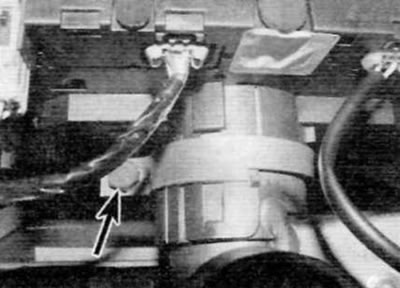
Figure 4.11, a. Release the locking clip of the switch assembly (marked with an arrow)...
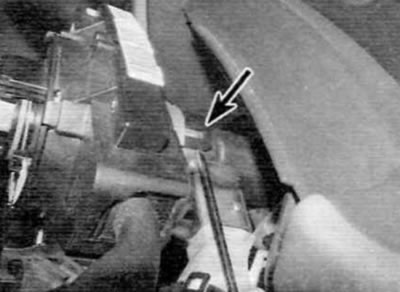
Figure 4.11, b....carefully move the latches away (marked with arrows) to the sides of the column...
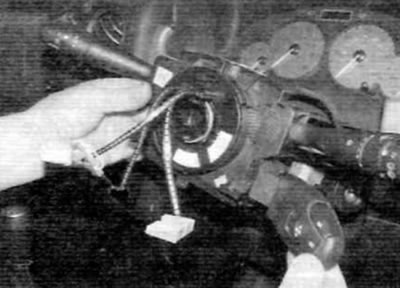
Figure 4.11, c....and remove the switch assembly (later models)
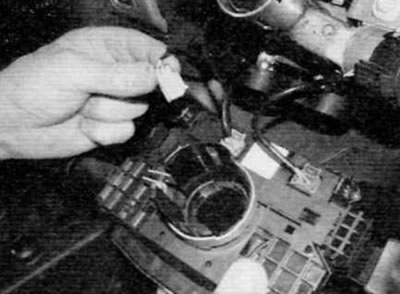
Figure 4.11, d. Turn the unit over and disconnect the electrical connectors (late models)
Warning. Be extremely careful not to damage the switch assembly latches.
12. If necessary, the audio unit remote control switch can be disconnected from the main switch.
13. Installation is performed in the reverse order of removal.
Note: If a new switch is installed, it must be initialized using dedicated test equipment. Leave this work to a Peugeot/Citroen dealer or a specialist with the appropriate equipment.
Switches mounted in the center of the front panel
Models produced before September 2002.
14. Using a small screwdriver, carefully remove the trim panel to gain access to the switches (figure 4.14).
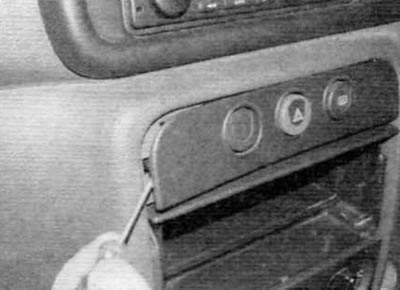
Figure 4.14. To access the switches, carefully remove the trim panel (early models)
15. Press the locking tabs on the side of the switch housing and remove the corresponding switch (figure 4.15, a.b). Disconnect the electrical connector and remove the switch.
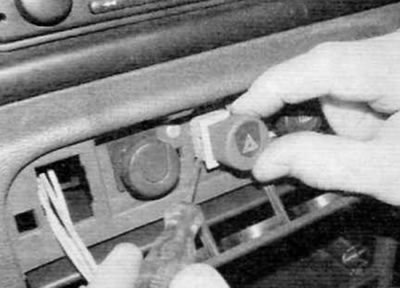
Figure 4.15, a. Press the locking tabs on the side of the switch housing...
Original text is located at: PEUGEOTBOOK
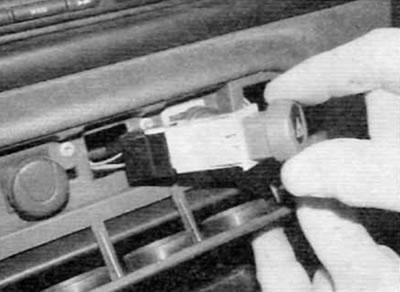
Figure 4.15, b....and remove the corresponding switch (early models)
16. Installation is carried out in the reverse order of removal.
Models produced after September 2002.
17. To access the switches, remove the trim panels in the center of the dashboard as described in Chapter 11.
18. To remove the lower switches, reach through the audio unit opening or through the opening on the side of the switch and push the corresponding switch out of the front panel (figure 4.18). Disconnect the electrical connector and remove the switch.
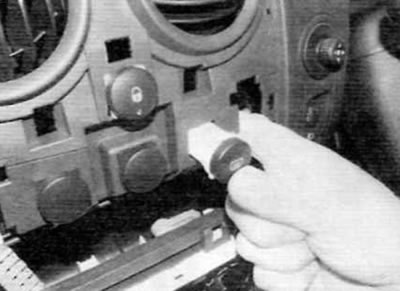
Figure 4.18. To remove the lower switches, place your hand into the opening on the front panel and push the switch out (late models)
19. To remove the top switches, press the locking tabs on the top of the switch housing and lift the switch off the faceplate (figure 4.19). Disconnect the electrical connector and remove the switch.
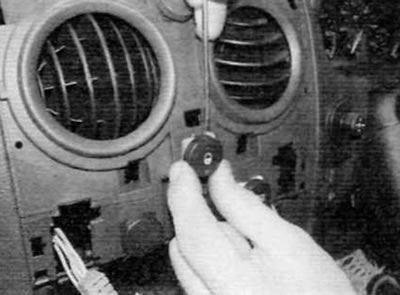
Figure 4.19. To remove the upper switches, press the locking tabs and remove the switch (late models)
20. Installation is performed in the reverse order of removal.
Switches mounted on the side of the front panel
21. On models produced before September 2002, additional switches are located above the fuse box on the driver's side.
22. Using a small screwdriver, carefully remove the trim panel around the switch cluster. Remove the screw and remove the switch assembly from the front panel. Disconnect the electrical connectors and remove the unit. The switch can be pushed out from the back of the panel.
23. On models produced after September 2002, additional switches are located in the front panel near the heater/ventilation ducts. Using a small screwdriver, carefully pry out the corresponding switch. Disconnect the electrical connector and remove the switch.
24. Installation is carried out in the reverse order of removal.
Heating/ventilation control switches
25. These switches are an integral part of the heating/ventilation control panel and cannot be replaced individually. If any switch is faulty, the entire control panel must be replaced (for details, refer to chapter 3).
Brake light switch
26. Contact chapter 9.
Parking brake indicator lamp switch
27. Contact chapter 9.
Interior light switch
28. Interior light switches are an integral part of the door locks. For detailed information on removing and installing the door lock, please refer to chapter 11.