



Table of contents: Automatic anti-pinch protection 🠇 Initialization of window lifters 🠇 Locking the rear door window switches 🠇
The window lifts of all doors of the car can be controlled using the keys located on the driver's door. The control of the other doors is carried out by individual keys of each door.
Note: The windows can be used even after the ignition is turned off (including after opening the front doors).
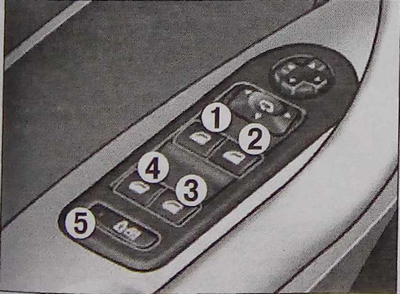
Window lifters:
1 - Driver's door window switch;
2 - Right front door window lift switch;
3 - Right rear door window lift switch;
4 - left rear door window lift switch;
5 - rear door window switch lock button.
The window lifter can operate in two modes.
Manual operation mode: briefly press the key or pull it without going beyond the stop point. The glass will stop as soon as the key is released.
Automatic operation mode: press the up or down key all the way, the glass opens or closes completely when the key is released. Pressing the key again stops the glass.
Automatic anti-pinch protection
If the door glass encounters an obstacle while being raised, it stops and partially lowers.
Initialization of window lifters
If the automatic window closing does not work, the window lifts must be initialized.
Pull the switch until the glass stops completely.
Release it and pull again until the window is completely closed.
After the glass closes, hold the key for another second.
Press the button so that the glass automatically lowers to the end.
Once the glass has dropped to its lowest position, press the button again for about a second.
Note: The automatic anti-pinch function does not work during these operations.
[Original can be viewed at: PeugeotBook]
Locking the rear door window switches
Press button 5 to lock the rear window switches in any window position.
If the control lamp on the panel is on, the rear windows are disabled.
If the control lamp on the panel does not light, then the rear windows are in an active state.