



This device provides assistance while driving a car. automatically maintaining a constant speed set by the driver. The device can be activated at speeds exceeding 40 km/h.
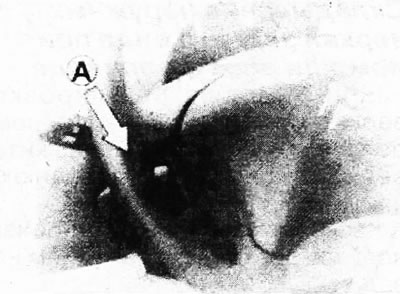
The cruise control lever A is located under the steering column switch for the direction indicator and exterior lighting.
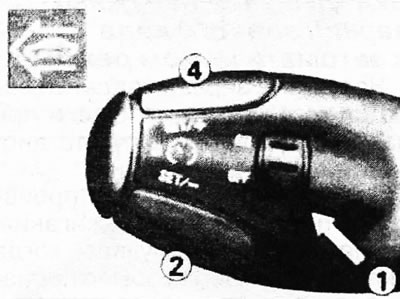
Install the cruise control rotary switch 1 in the ON position. Switching off is performed by moving the switch to the OFF position.
Selecting the speed of movement
Press the accelerator pedal to reach the required speed.
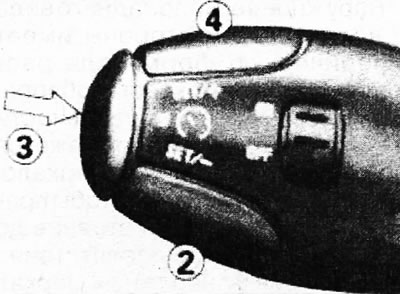
By briefly pressing the rear edge of button 2 or button 4 on control lever A, enter the set speed.
The driving speed can be changed at any time by pressing the accelerator pedal to increase it, for example, to overtake.
After overtaking, release the accelerator pedal and the car will automatically switch to the speed stored in the cruise control memory.
Briefly pressing the back edge of key 4 increases the speed of movement.
Briefly pressing the back edge of key 2 decreases the speed.
Cruise control is deactivated by pressing the brake or clutch pedal, by activating the ESP or ASR system, or by pressing button 3, located on control lever A. This does not delete the previously set speed from the device's memory.
After disabling the cruise control, briefly press the rear edge of button 2 or button 4 on control lever A to turn it on. Once switched on, the vehicle speed will reach the value that was last stored in the cruise control memory.
By pressing and holding the rear edge of button 4 on control lever A, you can increase the programmed speed. After releasing the key, the system will register the new speed value.
The programmed speed is reduced by long pressing the rear edge of button 2 on control lever A, but not below the minimum speed at which the cruise control can operate.
After releasing the key, the system will register the new speed value.