Table of contents: Instrument panel indication 🠇 Programming 🠇 Exceeding the programmed speed 🠇 Return to normal driving mode 🠇 Serviceability control 🠇
The system maintains the vehicle speed set by the driver.
The limiter and regulator are programmed manually: they can be programmed for a speed of at least 30 km/h. The programmed speed parameter remains in the system memory even after the ignition is turned off.
If the driver needs to temporarily exceed the speed limit, he should press the accelerator pedal.
To return to the set speed, it is enough to slow down so that the speed decreases to the set value.
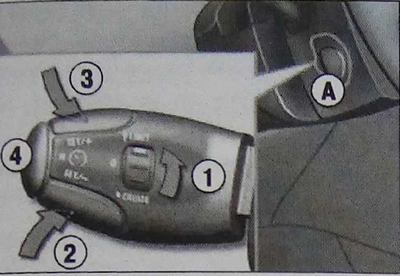
The system controls are located on the steering column switch on lever A on the left side.
[Original is contained on the portal: PeugeotBook.ru]
1. Limiter mode selection regulator.
2. Speed parameter decrease button.
3. Speed parameter increase button.
4. On/off button for limitation.
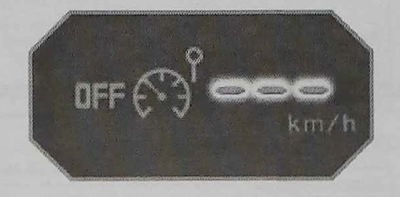
Instrument panel indication
The programmed information is displayed on the instrument panel display.
5. Mode indicator light: limit on/off.
6. Indicator lamp for active limiter status.
7. Programmed speed parameter.
Programming
Turn knob 1 to the "LIMIT" position: from now on, the limiter is activated, but not yet switched on (OFF). It must be switched on so that the system can regulate the speed mode.
Set the speed parameter by pressing button 2 or 3 (for example, 90 km/h).
You can then change the set speed parameter using buttons 2 and 3:
- with an interval of + or - 1 km/h - with short presses;
- with intervals of + or - 5 km/h - by long presses;
- in increments of + or - 5 km/h - by continuous pressing.
Turn on the limiter by pressing button 4.
Switch off the limiter by pressing button 4 again (the display will show a confirmation of switching off "OFF").
Exceeding the programmed speed
When you press the accelerator smoothly, the speed mode will not change. In order to change it, you need to press the pedal sharply enough, overcoming the point of resistance. The action of the limiter will immediately stop, and the programmed speed parameter will start flashing on the display.
Once you return to driving at the programmed speed, the flashing will stop.
Return to normal driving mode
Turn the knob 1 to the "0" position: from now on the limiter will be disabled. The speed mode will be displayed only by the speedometer.
Serviceability control
If the system fails, a series of flashing dashes will appear on the display instead of the speed parameter.