



Table of contents: Turning on the cruise control system 🠇 Memorizing speed 🠇 Disabling the stored speed 🠇 Changing the speed entered into the…🠇 Cancel the speed entered into memory 🠇
The cruise control system ensures that the set speed is maintained if the engine can provide it, and relieves the driver from having to press the accelerator pedal to maintain it.
The system can remember the vehicle speed if it exceeds 40 km/h, and 4th or 5th gear must be engaged.
Caution! Cruise control should not be engaged in heavy traffic or adverse road conditions (icy or wet road, gravel surface).
Turning on the cruise control system
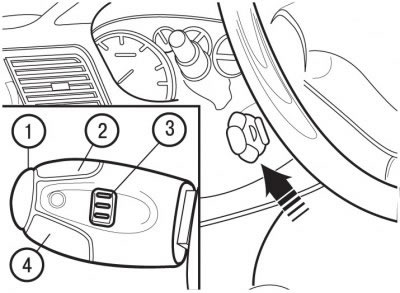
Figure 1.38. Location of the cruise control handle: 1 - switch for disabling the stored speed; 2 - memory and speed increase switch; 3 - cruise control system switch; 4 - memory and speed reduction switch
Turn the ring switch of lever 3 (figure 1.38) to the "ON" position.
To turn off the system, set ring switch 1 to the "OFF" position.
Memorizing speed
Once the vehicle reaches the desired speed, press switches 1 or 4. The speed will be entered into the system memory and will be maintained automatically from that moment on.
(Source of the article is posted at peugeotbook)
Note: You can briefly press the accelerator pedal; this will not disable the stored speed.
Disabling the stored speed
If you want to temporarily disable the speed stored in the system memory, press switch 1, the brake pedal or the clutch pedal.
After temporarily disabling the speed, press switch 4 again. The car will again move at the speed entered into memory.
Changing the speed entered into the system memory
The set speed can be increased without pressing the accelerator pedal by pressing and holding switch 2. Once the desired speed is reached, release the switch.
Reduce the set speed by pressing switch 4. Once the required speed is reached, release the switch.
Cancel the speed entered into memory
Set switch 3 to the "OFF" position or turn off the ignition.