
English Русский
Български
Беларускі
Український
Српски
Hrvatski
Română
Polski
Slovenský
Magyar
Bookmark Articles Sitemap Contacts
Company Hyundai Company Opel Company Skoda Company Kia Company Mitsubishi Company LADA Company Audi
PeugeotBook.ru


Series 100   Series 200   Series 300   400-500   Series 600   Crossovers   Others
 
Peugeot 206 (1998-2012) Peugeot 207 (2006-2014)

On-board computer (Peugeot 206)

  • Main
  • 20X
  • Peugeot 206 (1998-2012)
  • General information
  • User manual
  • On-board computer
0
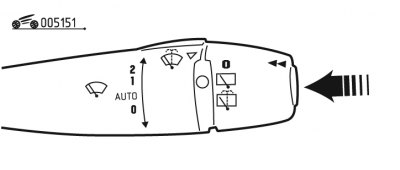
Figure 1.51. On-board computer control

Figure 1.51. On-board computer control


The on-board computer is controlled by pressing the button located on the end of the right steering column switch (figure 1.51).
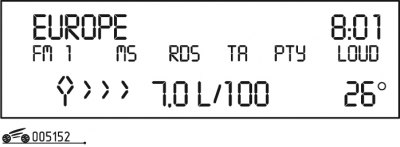
Figure 1.52. Display readings for type B

Figure 1.52. Display readings for type B


Each time the end button of the windshield wiper switch is pressed, the B-type display (figure 1.52) shows consistently:
  • autonomy (see below);
  • distance traveled;
  • average fuel consumption;
  • current fuel consumption;
  • average speed.

To set the display to zero, press the button and hold it for more than 2 seconds.
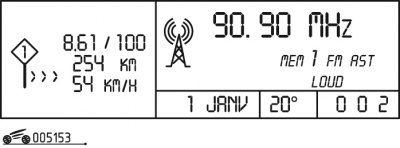
Figure 1.53. Type C display readings

Figure 1.53. Type C display readings


When the vehicle is equipped with a type C display (figure 1.53) the parameters are displayed sequentially:
  • current fuel consumption and autonomy (see below);
  • average fuel consumption, distance traveled and average speed determined for period "1";
  • average fuel consumption, distance traveled and average speed determined for period "2".

Periods "1" and "2" are determined by the frequency of setting to zero. This allows you to determine the average position for the period of time you select, where "1" is a day, "2" is a month.

To set the display to zero and define a new period, press the button and hold it for more than 2 seconds when the desired period is displayed.
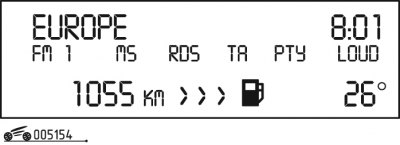
Figure 1.54. «Autonomy» mode

Figure 1.54. "Autonomy" mode


(Information copied from the resource: www.PEUGEOTBOOK.ru)

"Autonomous" mode (figure 1.54) allows you to judge the distance in km that can be traveled with the fuel remaining in the tank.

When there is less than 3 liters of fuel left in the tank, only three horizontal segments light up on the display instead of numbers.

After resetting the on-board computer, information about autonomy will not be displayed until the car has traveled a certain distance.
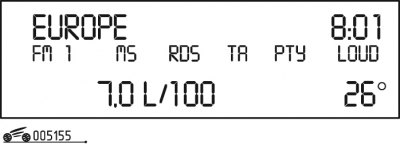


Figure 1.55. «Current fuel consumption» mode

Figure 1.55. "Current fuel consumption" mode


"Current fuel consumption" mode (figure 1.55) allows you to judge fuel consumption over the last 2 seconds. Data is provided when the car is moving at a speed of more than 20 km/h.
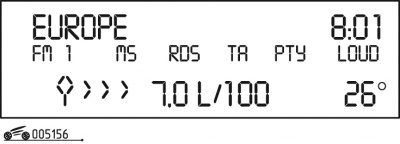
Figure 1.56. «Average fuel consumption» mode

Figure 1.56. "Average fuel consumption" mode


Mode "Average fuel consumption" (figure 1.56) provides information on fuel consumption in relation to the distance traveled after the last reset of the on-board computer readings.
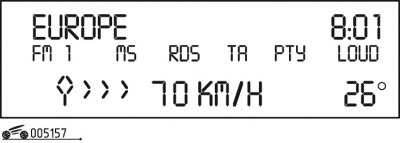
Figure 1.57. «Average speed» mode

Figure 1.57. "Average speed" mode


Mode "Average speed" (figure 1.57) shows the average speed after the last reset of the trip computer readings (by dividing the distance traveled by the travel time starting from the moment the ignition was turned on).
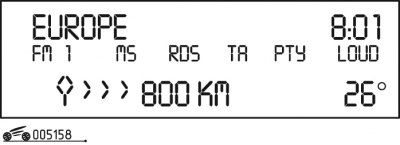
Figure 1.58. «Path traveled» mode

Figure 1.58. "Path traveled" mode


"Path Passed" mode (figure 1.58) allows you to judge the distance traveled after the last reset of the on-board computer readings.

If, while driving, horizontal segments light up on the display instead of numbers, it means that the on-board computer is faulty - contact a service station.
This article is available at russian, bulgarian, belarusian, ukrainian, serbian, croatian, romanian, polish, slovak, hungarian
Article reviewed by editor: Matveev Demid
Share information:
Previous
Peugeot 206: User manual
Next

Parking brake
Steering column switches
On-board navigation system
Digital and analog control devices
Control indicators
Electric windows
Headlight corrector
Adjusting the position of the steering wheel
Sound signal
Rear view mirrors
See similar information for other Peugeot models

➨ On-board computer Peugeot 406 (1995-2004)
➨ On-board computer Peugeot 605 (1989-2000)
➨ On-board computer Peugeot 806 (1994-2002)
Link to this article in different formats
Comments and feedback from visitors
No comments yet


Add two numbers 43 + 38


Peugeot 207 (2006-2014) 
  • General information
  • Car care
  • Governing bodies
  • Driving and operation
  • Power unit
  • Engine characteristics
  • Engine repair
  • Cooling system
  • Lubrication system
  • Ignition system
  • Control system (gasoline)
  • Fuel system (gasoline)
  • Control system (diesel)
  • Transmission
  • Clutch
  • Mechanical gearbox
  • Automatic gearbox
  • Drive shafts
  • Chassis, running gear
  • Car suspension
  • Steering
  • Brake system
  • Body and interior
  • Exterior (external elements)
  • Interior (internal elements)
  • Heating and air conditioning
  • Electrical equipment
  • Equipment and devices
  • Headlights and lighting
  • Power devices
  • Electrical circuits
Peugeot 206 (1998-2012) 
  • General information
  • User manual
  • Maintenance
  • Power unit
  • Gasoline engines
  • Diesel engines
  • Diesel power system
  • Engine management system
  • Transmission
  • Clutch
  • Mechanical gearbox
  • Automatic gearbox
  • Drive shafts
  • Chassis, running gear
  • Front suspension
  • Rear suspension
  • Steering
  • Brake system
  • Body and interior
  • Body elements
  • Doors, locks and windows
  • Electrical equipment
  • Equipment and devices
  • Electrical circuits
PeugeotBook.ru © 2018–2026 | Mobile version | Sitemap: EN BG BY UA RS HR RO PL SK HU | Write message | Site search | Add to bookmarks | Peugeot owners
106 (1991-2003) | 206 (1998-2012) | 207 (2006-2014) | 305 (1977-1989) | 306 (1993-2002) | 307 (2001-2008) | 405 (1987-1997) | 406 (1995-2004) | 605 (1989-2000) | Partner-I (1996-2008) | Eurovans-807 (2002-2014) | Eurovans-806 (1994-2002) | J5 (1981-1993) |
Cookies are used to ensure the correct display of pages on the site.