



Table of contents: Information retrieval system 🠇 Display type A 🠇 Display type B 🠇 Display type C 🠇
The installation of digital and analog instruments depends on the model and configuration of the vehicle.
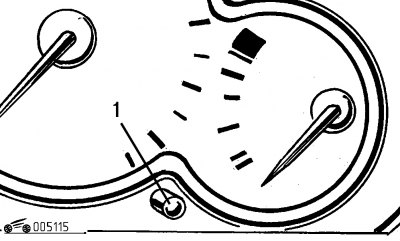
Figure 1.15. Turning on the mileage counter
The odometer displays the readings on the instrument panel display when the ignition key is set to position "A" and button 1 is pressed (figure 1.15) in the instrument cluster. By pressing the button alternately, the display shows the total or daily mileage of the car.
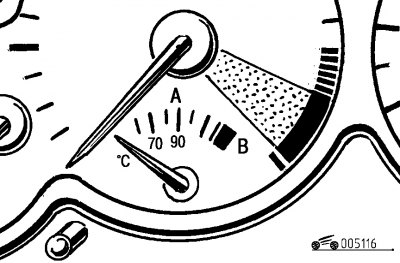
Figure 1.16. Coolant temperature gauge
Coolant temperature gauge analog (switch) type (figure 1.16)
The instrument scale has two sectors - the general A and the red B. When the arrow is in sector A, the engine has a normal operating temperature. When the arrow is in the red B sector, the engine is overheated.
The central "Stop" malfunction indicator, which starts flashing when the coolant overheats, also serves to monitor the engine's thermal condition.
Stop the car, let the engine cool down, check the coolant level and identify the cause of its overheating.
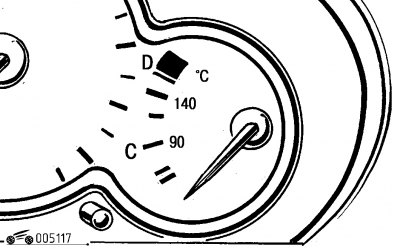
Figure 1.17. Oil temperature gauge
Engine oil temperature gauge analog (switch) type (figure 1.17).
The instrument scale has two sectors - the general C and the red D. When the arrow is in sector C, the engine has a normal operating oil temperature. The movement should occur at normal revolutions and speeds. When the arrow is in the red sector D, the oil in the engine is overheated.
Reduce the speed of the vehicle or stop it, let the engine cool down, check the oil level and identify the cause of its overheating.
Multifunctional display 10 (see figure 1.11) located on the instrument panel, after the ignition is turned on it is designed to sequentially perform three functions:
- mileage indicator until the next maintenance (TO);
- engine oil level indicator;
- mileage counter (total and daily).
After turning on the ignition, the oil level indicator lights up for about 10 seconds, followed by the mileage indicator until the next maintenance.
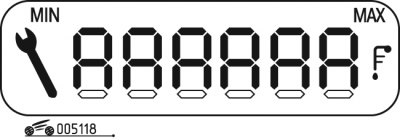
Figure 1.18. Oil level indicator
The display shows (figure 1.18):
- the maximum oil level that must be checked using the dipstick (exceeding the maximum level may result in engine failure);
- the minimum oil level, which must be checked using a dipstick, and 10-15 minutes must pass after the engine has stopped (lowering the minimum level can also lead to engine failure);
- a faulty oil level sensor is confirmed by six flashing segments.
Tachometer 24 (see figure 1.12) analog (switch) type allows you to visually monitor the engine crankshaft speed.
Caution! Avoid placing the arrow in the red range of the instrument scale.
Fuel gauge 26 (see figure 1.12) analog (switch) type. To check the device's functionality, there is an indicator that lights up for a while when the ignition is turned on. If the lamp lights up constantly, this indicates that there are about 5 liters of fuel left in the car's tank.
The accuracy of the device readings depends on the tilt of the car, so it is necessary to always have a reserve of fuel and not to use it up until the tank is "dry", which can lead to failure of the engine fuel system.
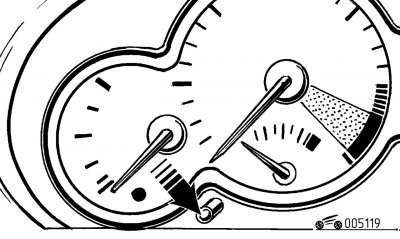
Figure 1.19. Instrument cluster illumination intensity regulator
Instrument cluster lighting intensity control - changes the brightness of the instrument cluster lighting and the multifunctional display. To do this, turn on the outside lighting and press the button (figure 1.19).
When the minimum is reached (or maximum) light intensity, release the button and then press it again to increase (or reduce) lighting. When the desired result is achieved, release the button.
By pressing key 9 (see figure 1.11.) the hazard warning lights turn on all direction indicators and start flashing after you press the hazard warning lights.
Information retrieval system
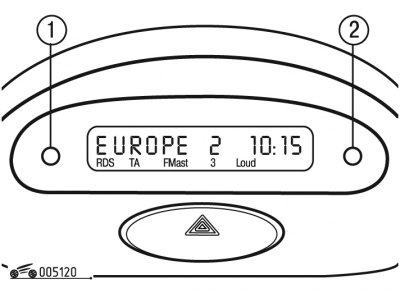
Figure 1.20. Type A display
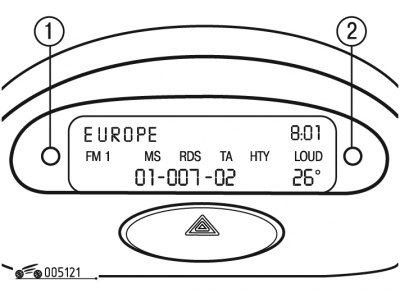
Figure 1.21. Type B display
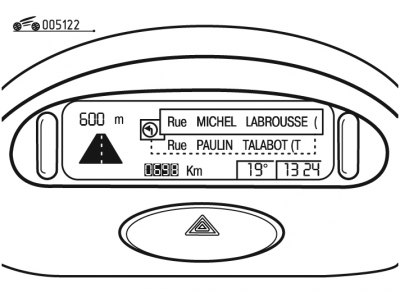
Figure 1.22. Type C display
The Peugeot 206 car is equipped with several types of displays - A (figure 1.21) and C (figure 1.22).
The status of the parameters is displayed in both alphanumeric and graphical form.
Display type A
The information retrieval system operates when the ignition is on and allows you to obtain the following information:
- time;
- date;
- ambient air temperature;
- car radio mode indicator;
- position of body doors (their discovery);
- emergency status message.
Each press of the button 1 (see figure 1.20) allows you to "scroll" through the parameters in the following order:
- language of the information displayed on the display;
- watch (12 or 24 hour display mode);
- minutes;
- year;
- month;
- day;
- temperature (fahrenheit or Celsius).
By holding down button 1 for 2 seconds, you can access the settings, the selected parameter starts flashing and can be changed.
A short press on button 2 allows you to change the value of the selected parameter. To quickly change the value, hold down button 2, and after reaching the maximum value, the adjustable parameter returns to zero and begins to increase again.
If no action is taken within 7 seconds, the display returns to normal mode, storing all new settings in memory.
A short press on button 2 allows you to obtain information about the outside air temperature within a few seconds.
Display type B
The information retrieval system operates when the ignition is on and allows you to obtain the following information:
- time;
- date;
- ambient air temperature;
- car radio mode indicator;
- position of body doors (their discovery);
- emergency status message;
- on-board computer information.
Each press of the button 1 (see figure 1.21) allows you to "scroll" through the parameters in the following order for adjustment:
- language of the information displayed on the display;
- units of speed measurement (km/h or mph);
- temperature (fahrenheit or Celsius);
- time format (12 or 24 hour display mode);
- watch;
- minutes;
- year;
- month;
- number.
By holding down button 1 for 2 seconds, you can access the adjustments; the selected parameter starts flashing and can be changed.
A short press of button 2 allows you to change the value of the selected parameter step by step. To change the value quickly, you must hold button 2 down; after reaching the maximum value, the adjustable parameter returns to zero and begins to increase again.
If no action is taken within 7 seconds, the display returns to normal mode, storing all new settings in memory.
Display type C
The information retrieval system operates when the ignition is on and allows you to obtain the following information:
- time;
- date;
- ambient air temperature;
- car radio mode indicator;
- position of body doors (the opening is shown by the pictogram);
- emergency status message;
- on-board computer information;
- information from the on-board navigation system.
Adjustments are made using the remote control. Emergency messages can be cleared by pressing the confirmation button on the remote control.