



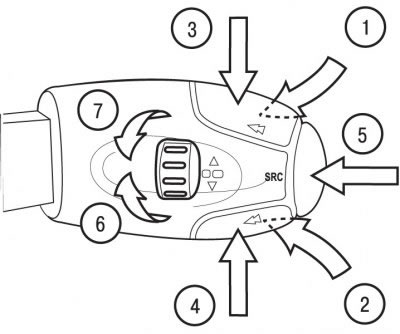
Figure 1.67. Location of car radio control buttons on the steering column switch: 1 - volume increase button; 2 - volume down button; 3 - button for automatic search of stations in the upper range (radio) and select the next track (CD player); 4 - button for automatic search of stations in the lower range (radio) and select the previous track (CD player); 5 - audio source selection button (radio, audio cassette player, CD player); 6 - handle for selecting stations stored in memory in the upper range (radio) and the next CD; 7 - handle for selecting stations stored in memory in the lower range (radio) and the previous CD
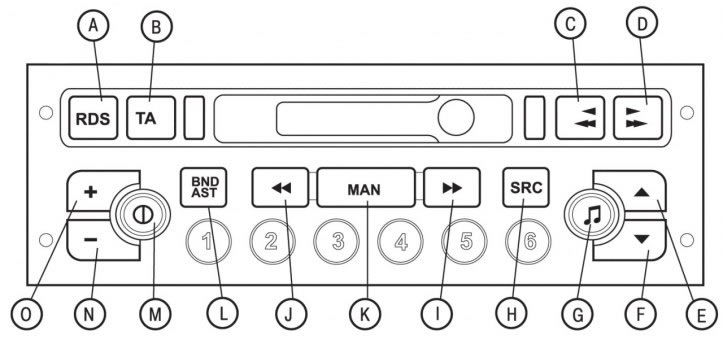
Figure 1.68. Location of controls for the RB3 car radio with cassette player on the front panel: A - button to turn on/off the RDS function and the regional transmitter tracking mode; B - button for turning on/off the priority of road information; C - fast rewind, change playback direction and eject audio cassette; D - fast forward, change playback direction and eject audio cassette; E - increase the sound volume level; F - decrease the sound volume; G - Adjusts the tone quality of low and high frequencies, increases the volume of sound (loudness), distributes the sound field and automatically adjusts the sound level; H - select audio source (radio, audio cassette player or CD player) and play CDs in random order; I - manual and automatic modes for searching stations in the upper part of the range, selecting the next track on a CD and PTY functions of the radio receiver; J - manual and automatic modes for searching stations in the lower part of the range, selecting the previous track on the CD and PTY functions of the radio receiver; K - automatic/manual modes of operation of buttons I and J in radio receiver mode; L - selection of frequency ranges FM1, FM2, FMMast, AM and automatic memorization of stations (autostore); M - turns the car radio on/off; N - decrease volume level; O - increase volume level; 1, 2, 3, 4, 5, 6 - calling stations stored in memory and storing a station; 1, 2, 3, 4, 5 - select a CD from the CD store
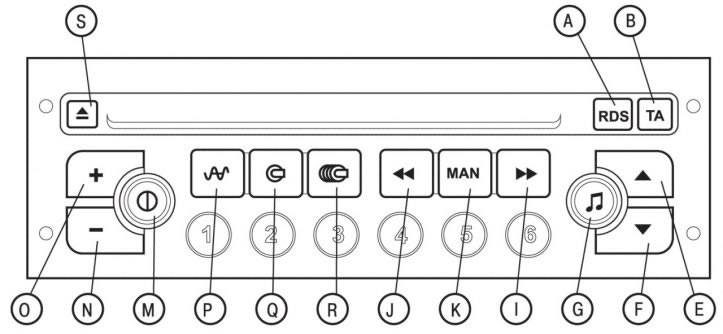
Figure 1.69. Location of controls for the RD3 car radio with CD player on the front panel: A - RDS function on/off button and regional transmitter tracking mode; B - button for turning on/off the priority of road information and the PTY function of the radio receiver; E - increase the sound volume level; F - decrease the sound volume; G - Adjusts the tone of high and low frequencies, functions for increasing the sound volume (loudness), sound field distribution and automatic sound level correction; I - manual and automatic modes for searching stations in the upper part of the range, selecting the next track on a CD and PTY functions of the radio receiver; J - manual and automatic modes for searching stations in the lower part of the range, selecting the previous track on the CD and PTY functions of the radio receiver; K - automatic/manual modes of operation of buttons I and J; M - turns the car radio on/off; N - decrease volume level; O - increase volume level; P - selection of radio receiver as a sound source, selection of frequency ranges FM1, FM2, FMAST, AM and automatic memorization of stations (autostore); Q - Selects the CD player as the sound source and plays CDs in random order; R - Selects the CD magazine as the sound source and plays CDs in random order; S - eject CD; 1, 2, 3, 4, 5, 6 - calling stations stored in memory and storing a station; 1, 2, 3, 4, 5 - select a CD from the CD store
The cars are equipped with car radios with a RB3 cassette player and an RD3 CD player. The car radios can be controlled using buttons on the steering column switch (figure 1.67) or directly from the car radio panel (figure 1.68, 1.69).