



Table of contents: Power on/off 🠇 Anti-theft system 🠇 Adjusting the sound volume 🠇 Setting up an audio system 🠇 Bass tone control 🠇 Treble tone control 🠇 Turning the volume boost feature on…🠇 Adjusting the balance of the front…🠇 Adjusting the balance of the right…🠇 Automatic volume adjustment 🠇 Features of radio signal reception 🠇 Switching to radio receiver mode 🠇 Selecting a frequency range 🠇 Manual station search mode 🠇 Manual station memorization mode 🠇 Automatic FM station memorization…🠇 Recalling stations stored in memory 🠇 Using the RDS function (radio data…🠇 Monitoring radio transmitters…🠇 Reception of programs transmitting…🠇 Local Radio Echo (REG) mode 🠇 PTY function (car radio RD3) 🠇 EON system (car radio RD3) 🠇 Turning on the audio cassette player…🠇 Removal an audio cassette 🠇 Playback direction 🠇 Fast forward and rewind 🠇 Recommendations for using audio…🠇 Enabling CD player mode (car radio…🠇 Ejecting a CD 🠇 Speed up listening to CD recordings 🠇 Playing records in random order (RDM) 🠇 Enabling the CD player with a CD…🠇 Selecting a CD 🠇 Speed up listening to CD recordings 🠇 Playing records in random order (RDM) 🠇 CD player with CD magazine 🠇
Power on/off

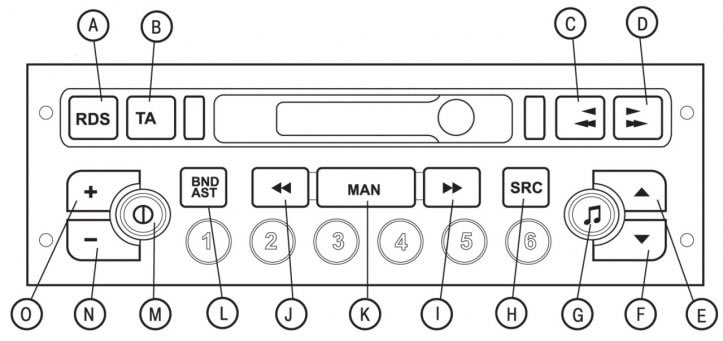
Figure 1.68. Location of controls for the RB3 car radio with cassette player on the front panel: A - button to turn on/off the RDS function and the regional transmitter tracking mode; B - button for turning on/off the priority of road information; C - fast rewind, change playback direction and eject audio cassette; D - fast forward, change playback direction and eject audio cassette; E - increase the sound volume level; F - decrease the sound volume; G - Adjusts the tone quality of low and high frequencies, increases the volume of sound (loudness), distributes the sound field and automatically adjusts the sound level; H - select audio source (radio, audio cassette player or CD player) and play CDs in random order; I - manual and automatic modes for searching stations in the upper part of the range, selecting the next track on a CD and PTY functions of the radio receiver; J - manual and automatic modes for searching stations in the lower part of the range, selecting the previous track on the CD and PTY functions of the radio receiver; K - automatic/manual modes of operation of buttons I and J in radio receiver mode; L - selection of frequency ranges FM1, FM2, FMMast, AM and automatic memorization of stations (autostore); M - turns the car radio on/off; N - decrease volume level; O - increase volume level; 1, 2, 3, 4, 5, 6 - calling stations stored in memory and storing a station; 1, 2, 3, 4, 5 - select a CD from the CD store
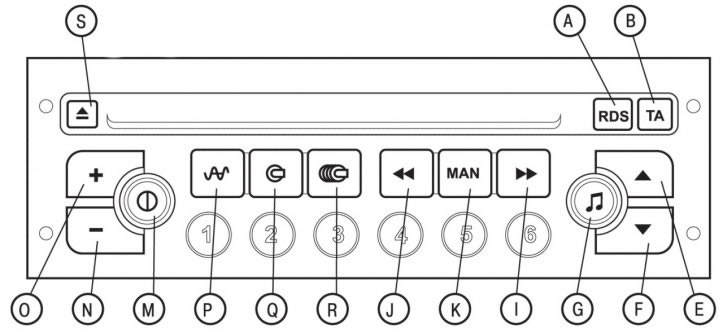
Figure 1.69. Location of controls for the RD3 car radio with CD player on the front panel: A - RDS function on/off button and regional transmitter tracking mode; B - button for turning on/off the priority of road information and the PTY function of the radio receiver; E - increase the sound volume level; F - decrease the sound volume; G - Adjusts the tone of high and low frequencies, functions for increasing the sound volume (loudness), sound field distribution and automatic sound level correction; I - manual and automatic modes for searching stations in the upper part of the range, selecting the next track on a CD and PTY functions of the radio receiver; J - manual and automatic modes for searching stations in the lower part of the range, selecting the previous track on the CD and PTY functions of the radio receiver; K - automatic/manual modes of operation of buttons I and J; M - turns the car radio on/off; N - decrease volume level; O - increase volume level; P - selection of radio receiver as a sound source, selection of frequency ranges FM1, FM2, FMAST, AM and automatic memorization of stations (autostore); Q - Selects the CD player as the sound source and plays CDs in random order; R - Selects the CD magazine as the sound source and plays CDs in random order; S - eject CD; 1, 2, 3, 4, 5, 6 - calling stations stored in memory and storing a station; 1, 2, 3, 4, 5 - select a CD from the CD store
To turn the car radio on or off, press the "M" button (see figure 1.68, 1.69). In this case, the key must be turned in the ignition switch to position "1" ("Auxiliary consumers") or "2" ("Ignition on").
The car radio can operate for 30 minutes with the ignition off.
Anti-theft system
The car radio is coded in such a way that it can only work in the car in which it is installed during the manufacturing process. It will not work when installed on any other vehicle.
The anti-theft system operates in a fully automatic mode and does not require any decoding actions.
Adjusting the sound volume
Pressing the "O" button successively increases the volume level, and pressing the "N" button successively decreases it. Continuously pressing the "O" and "N" buttons allows you to smoothly adjust the volume level.
Setting up an audio system

Press the "G" button one after the other to adjust the low frequency (BASS), high frequency (TREB) timbres, volume up (LOUD), front-rear speaker balance (FAD), right-left speaker balance (BAL), and auto volume control functions. The audio system will automatically return to normal operation after a few seconds if no buttons are pressed, or by pressing the "G" button after setting the automatic volume control function.
Bass tone control

When the display shows "BASS", adjust the bass level by pressing the "E" and "F" buttons:
- "BASS — 9" — minimum low-frequency volume level;
- "BASS — 0" — normal volume level of low frequencies;
- "BASS + 9" is the maximum volume level of low frequencies.
Treble tone control
When the display shows "TREB", adjust the treble tone level by pressing the "E" and "F" buttons:
- "TREB - 9" - minimum high frequency volume level;
- "TREB - 0" - normal high frequency volume level;
- "TREB + 9" is the maximum volume level of high frequencies.
Turning the volume boost feature on and off
This function allows you to automatically increase the levels of high and low frequency tones. To turn this function on or off, press the "E" or "F" buttons.
Adjusting the balance of the front and rear speakers (Fader)
When the message "FAD" appears on the display, press the "E" or "F" buttons one after the other to make the adjustment. The "E" button allows you to increase the volume of the front speakers. The "F" button increases the volume of the rear speakers.
Adjusting the balance of the right and left speakers (Balance)
When the display shows "BAL," press the "E" or "F" buttons to make adjustments. The "E" button increases the volume of the right speakers. The "F" button increases the volume of the left speakers.
Automatic volume adjustment
This function is designed to automatically adjust the volume level of the audio system depending on the noise level in the cabin, which changes with the vehicle speed.
To turn this function on or off, press the "E" or "F" buttons.
Features of radio signal reception
A car radio is subject to the influence of many external factors that are not present when the receiver is permanently installed in the home. Reception of radio signals with amplitude and frequency modulation, respectively LW/MW and FM, is associated with interference, which depends on the reception conditions and the type of signal, but not on the quality of the radio receiver.
The reception quality of the amplitude-modulated (LW/MW) radio signal is degraded when the vehicle is moving near high-voltage power lines, under bridges or in tunnels.
Frequency modulated (FM) radio signals can be severely distorted due to excessive distance from the radio transmitter, due to reflections from various obstacles (mountains, hills, buildings, etc.). Interference with radio signal reception can also occur in radio shadow areas (areas closed to the radio transmitter).
Switching to radio receiver mode

Car radio RBZ: press the "SRC" button in sequence.
Car radio RD3: press the "P" button.
Selecting a frequency range

RBZ car radio: by briefly pressing the "BNDIAST" button you can select the desired range: FM1, FM2, FM or AM.
Car radio RD3: by briefly pressing the "P" button you can select any of the ranges FM1, FM2, FMast or AM.

Automatic station search mode
Briefly press one of the "I" or "J" buttons to tune to the next or previous station, respectively.
By long pressing the corresponding button, the frequency will continuously change in the selected direction.
After releasing the button, the search will continue and stop after tuning to the nearest station. If the TA traffic information program is selected, the radio will only search for stations broadcasting this type of information. Automatic station search occurs with "LO" sensitivity (tuning is performed only on the most powerful radio transmitters), until the entire range has been covered, and then the search is repeated with the "DX" sensitivity (tuning is performed on weaker and more distant radio transmitters).
To immediately adjust the sensitivity to "DX", press the "I" or "J" button twice.
Manual station search mode
Click on the "MAN" button.
Briefly press the "I" or "J" buttons respectively to increase or decrease the tuning frequency by a certain step.
Pressing and holding these buttons will cause the radio to continuously change the tuning frequency in the selected direction.
The frequency change will stop after releasing the button.
Pressing the "MAN" button again will return you to the automatic station search mode.
Manual station memorization mode
Tune to the desired station.
Press one of the preset buttons "1" to "6" and hold it down for more than 2 seconds.
The sound will pause for a moment and then resume to confirm that the station has been stored in the car radio's memory.
Automatic FM station memorization mode (autostore)
 Car radio RB3: Press and hold the "BNDIAST" button for more than 2 seconds.
 Car radio RD3: press and hold the "P" button for more than 2 seconds.
Pressing and holding these buttons activates the radio's automatic memorization of six stations with the best FM reception. These stations will be stored in the Fmast band memory.
If it is not possible to find all six stations to store in the car radio's memory, the remaining memory cells will remain free.
Recalling stations stored in memory
Briefly press one of the buttons "1" - "6" to call up the corresponding station stored in memory in each frequency range.
Using the RDS function (radio data systems) in the FM range

The RDS system allows, when tuning to a specific station, to ensure the best quality of radio reception by automatically switching to other transmitters located along the vehicle's route that operate in the RDS standard and broadcast the same radio program on other frequencies.
To turn the RDS function on or off, briefly press the "RDS" button. The display will show:
- "RDS" if the function is enabled;
- "(RDS)" if the function is enabled but there are no transmitters operating in this system.
Monitoring radio transmitters operating in the RDS standard
When the RDS function is turned on, the name of the station to which the radio receiver is tuned is displayed on the display. As the vehicle moves, the radio continuously and automatically selects the transmitter that provides the best reception quality for the selected program.
Reception of programs transmitting traffic information

To turn the traffic information function on or off, press the "TA" button. The display will show:
- "TA" if the function is enabled;
- "(TA)" if the function is enabled, but there are no transmitters operating in this system.
The transmission of any traffic announcements has priority regardless of which audio source is turned on (radio, audio cassette player or CD player).
If you want to interrupt the traffic information broadcast, press the "TA" button. This feature will be disabled.
Please note: Traffic information is transmitted at a preset volume level, independent of the audio system's volume setting. However, this level can be changed using the volume control. The changed setting will be stored in memory and future traffic announcements will be received at this volume level.
Local Radio Echo (REG) mode
In some regions, transmitters are networked together to broadcast local programming in the regions they serve. This tracking feature allows you to listen to the program in high quality while driving across the region.
To turn this function on or off, press and hold the "RDS" button for more than 2 seconds.
PTY function (car radio RD3)
This function allows you to tune into stations that broadcast a specific type of information (news, culture, sports, rock music...).
 When the radio is in the FM range, press and hold the "TA" button for more than 2 seconds to turn this function on or off.

To search for one of the programs in PTY mode:
- turn on the PTY function;
- by briefly pressing the "I" or "J" buttons, select the desired type of program from the list that appears on the display;
- after the desired program appears on the display, press and hold one of the "I" or "J" buttons for more than 2 seconds to perform automatic tuning (after automatic tuning is completed, the PTY function is disabled).
In PTY mode, you can store various types of programs into the car radio's memory. To do this, press and hold one of the preset buttons "1" - "6" for more than 2 seconds. To recall the corresponding program type from memory, briefly press one of the preset buttons.
EON system (car radio RD3)
This system allows you to listen to transmitters connected to the same network. It allows you to listen to traffic information or a PTY programme broadcast by a station that belongs to the same network as the station the radio is tuned to. This function only works when the TA function or PTY function is turned on.
Turning on the audio cassette player (rB3 car radio)

Insert the audio cassette into the slot until it stops. At the same time, the car radio will automatically switch to the audio cassette player mode and begin playing the audio cassette.
Caution! Before inserting a cassette into the player, make sure the tape is taut.
If the audio cassette is already inserted into the receiver, press the "SRC" button to turn on the player.
Removal an audio cassette

To eject the audio cassette, press the two buttons "C" and "D" all the way down.
Playback direction
The audio cassette player plays sides 1 and 2 of the audio cassette alternately, automatically reversing the direction of the tape when it runs out on one side of the cassette.
To manually switch the playback direction of an audio cassette, press the two buttons "C" and "D" halfway.
Fast forward and rewind
To rewind the film forward or backward, press the "C" or "D" button respectively and hold it for a while. Once rewinding is complete, the player begins playing the side of the audio cassette where the audio program recording begins.
Recommendations for using audio cassettes
Use only good quality and working audio cassettes.
Avoid using tapes with a playing time longer than 90 minutes.
Do not leave cassettes near heat sources or in direct sunlight.
If necessary, tighten the magnetic tape in the cassette before inserting it into the tape recorder.
Clean the magnetic heads regularly using a wet cleaning tape.
Enabling CD player mode (car radio RD3)

Insert a CD with the label facing up, the CD player will turn on automatically.
If there is already a CD in the player, press the "Q" button.
Ejecting a CD

To eject a CD from the player, press the "S" button.

Selecting a recording to listen to on a CD
Press the "I" button to select the next entry.
Press the "J" button to return to the beginning of the recording you are listening to or to select the previous recording.
Speed up listening to CD recordings
Press and hold one of the "I" or "J" buttons to quickly listen to the next or previous programs. Fast playback of the recordings will stop after you release the button.
Playing records in random order (RDM)
When selecting a CD player as the audio source, press the "Q" button for 2 seconds. The CD will begin playing in random order. To return to normal playback mode, press and hold the "Q" button again for 2 seconds. Random playback mode is disabled when the car radio is turned off.
Listening to self-recorded CDs may cause problems with your audio system.
Enabling the CD player with a CD magazine
 Car radio RB3: Press the "SRC" button repeatedly.
 Car radio RD3: press the "R" button.
Selecting a CD
Press one of the buttons "1" - "5" on the store or car radio to select the corresponding CD.

Selecting a recording to listen to on a CD
Press the "I" button to select the next entry.
Press the "J" button to return to the beginning of the recording you are listening to or to select the previous recording.
Speed up listening to CD recordings
Press and hold one of the "I" or "J" buttons to quickly listen to the next or previous programs. Fast playback of the recordings will stop after you release the button.
Playing records in random order (RDM)
When selecting a CD player as the audio source:
- rB3 car radio: press and hold the "SRC" button for 2 seconds;
- car radio RD3: press and hold the "R" button for 2 seconds.
The CD will begin playing in random order. To return to normal playback mode, press and hold the corresponding button again for 2 seconds.
CD player with CD magazine
The CD player with a CD magazine is located in the central part of the instrument panel below the car radio and can hold five CDs.
Discs should be loaded into the magazine with the label facing up.
To eject a disc, long press the corresponding button (from 1st to 5th).