



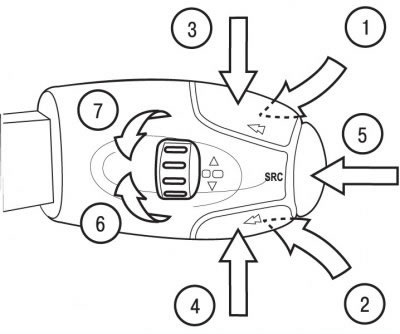
Figure 1.67. Location of car radio control buttons on the steering column switch: 1 - volume increase button; 2 - volume down button; 3 - button for automatic search of stations in the upper range (radio) and select the next track (CD player); 4 - button for automatic search of stations in the lower range (radio) and select the previous track (CD player); 5 - audio source selection button (radio, audio cassette player, CD player); 6 - handle for selecting stations stored in memory in the upper range (radio) and the next CD; 7 - handle for selecting stations stored in memory in the lower range (radio) and the previous CD
To increase the sound volume, press the button in direction 1 (see figure 1.67).
To decrease the sound volume, press the button in direction 2.
To turn off the sound ("MUTE"), press the buttons in directions 1 and 2 simultaneously.
The sound can be restored by pressing any button.
Automatic search for stations in the upper range of the radio receiver and selection of the next track of the CD player is carried out by pressing the button in direction 3.
Automatic search for stations in the lower range of the radio receiver and selection of the previous track of the CD player is carried out by pressing the button in direction 4.
Selecting an audio source (radio, audio cassette player, CD player) is carried out by pressing the end button in direction 5.
Selection of stations stored in the upper range of the radio receiver and the next compact disc is carried out by turning the knob clockwise in direction 6.
Selection of stations stored in the lower range of the radio receiver and the previous CD is carried out by turning the knob counterclockwise in direction 7.