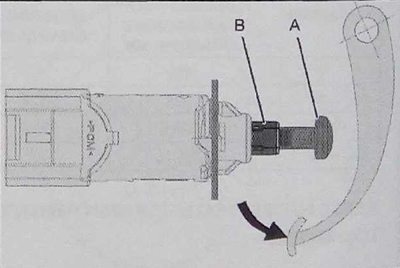
Table of contents: Adjusting the brake light switch…🠇 The brake pedal is loaded 🠇
Remove the trim under the control panel (1).
Disconnect the connector in area "a".
To unlock the brake light switch (2), turn it counterclockwise and remove it.
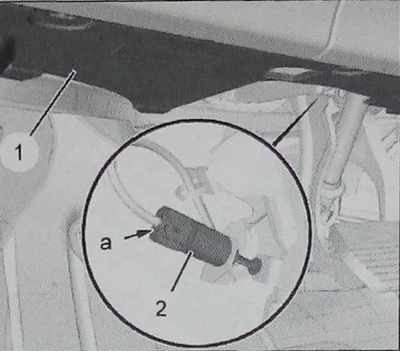
Caution: Make sure the brake pedal is in the upper position. Make sure it remains in this position throughout the operation.
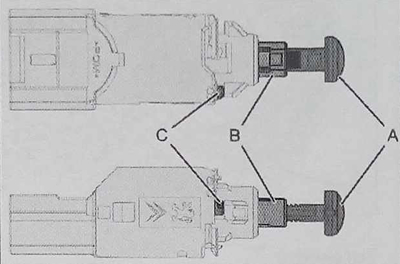
Make sure that the locking device "C" of the pusher support "B" is on the extension of the centering projection of the switch.
In this case, the travel of the pusher support "B" in the brake light switch (2) is limited.
Place the brake light switch (2) on the support so that the piston "A" rests on the brake pedal. To adjust the piston "A" in the pushrod support "B", press the brake light switch (2) firmly on the shaft until its base rests on the support. Turn the switch ¼ turn clockwise until it stops. Connect the switch in the area "a". Check that the brake lights turn on. Install the trim under the control panel.
Adjusting the brake light switch (the brake pedal is released)
Check the position of the push rod support (B) in the switch.
The pusher support (B) must be in contact with the switch housing and the pusher (A) must be in contact with the brake pedal.
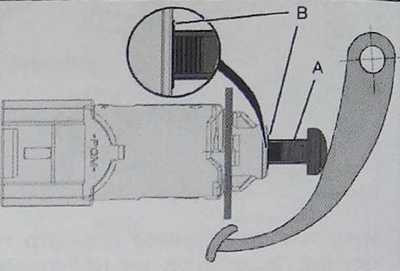
Note: The brake light switch (2) must not serve as a stop for the brake pedal.
The brake pedal is loaded
The push rod support (B) must be free and the push rod (A) must not touch the brake pedal.